Reorder or show/hide practice dashboards | Delete a practice dashboard
Reorder or show/hide practice dashboards
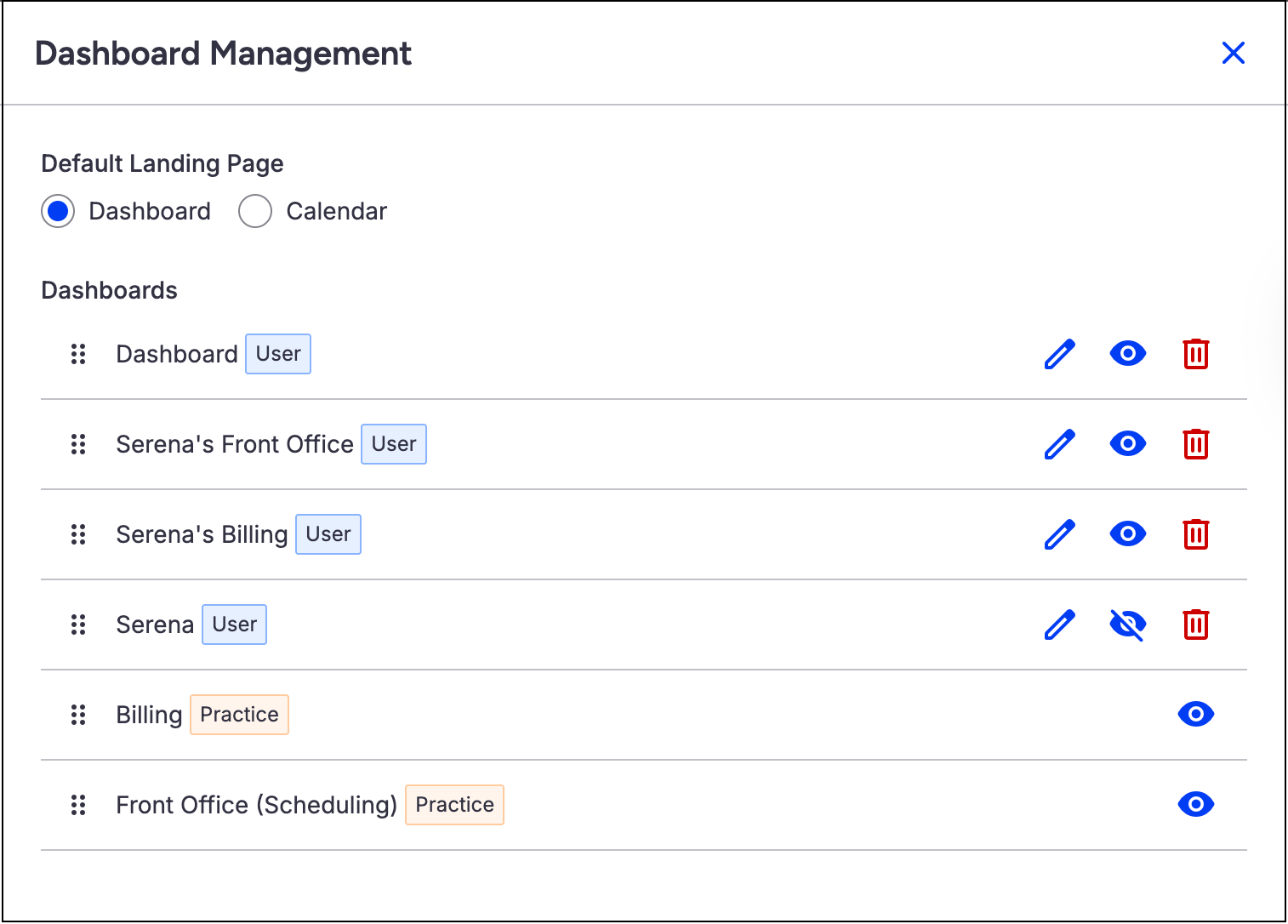
You can choose which practice dashboards are visible and arrange them in your preferred order.
To get started, from the Dashboard (Schedule > Dashboard), select the gear icon  to open the Dashboard Management drawer.
From there, you can:
- Reorder dashboards: Hover over the drag dots icon
 (the cursor changes to a grab cursor), then drag and drop to reorder the dashboard list.
- Dashboards appear from left to right based on their order from top to bottom in this list.
- Show or hide dashboards: Select the eye icon
 to show a dashboard, or the crossed-out eye icon
  to hide it.
 (the cursor changes to a grab cursor), then drag and drop to reorder the dashboard list.
 to show a dashboard, or the crossed-out eye icon
  to hide it.
Delete a practice dashboard
- From the General Management Dashboards page, select Delete for the specific dashboard.

- Select Delete Dashboard to confirm the deletion.
The dashboard is removed from the dashboard list.