Actions staff can perform on behalf of providers | Actions staff cannot perform on behalf of providers | Actions providers cannot perform on behalf of another provider
In DrChrono, all controlled prescriptions must be sent directly by the provider. Non-controlled substance prescriptions may be sent by authorized eRx delegates. This ensures compliance with prescribing regulations and maintains the highest standards of patient safety and accuracy.
Additional resources
| Setting Up eRx Delegates for Non-Controlled Substance Prescriptions | Sending Non-Controlled Prescriptions as a Delegate |
Actions staff can perform on behalf of providers
Staff users who access a provider’s account using the practice group dropdown can create draft prescriptions for provider review and signature to send.
- By default, staff users have read-only access to the Send eRx feature when acting on behalf of a provider.
- Exception: If the staff member has been designated as an eRx delegate, they can send non-controlled substance prescriptions electronically on behalf of the provider.
- The eRx audit log reflects both:
- The staff member (delegate) who sent the prescription
- The provider on whose behalf it was sent
Actions staff cannot perform on behalf of providers
Staff users acting on behalf of providers (using the practice group dropdown):
- Cannot send controlled substance prescriptions under any circumstances
- Cannot send any prescriptions unless they are explicitly assigned as an eRx delegate for that provider
- Cannot complete RxChange, RxNew, or RxCancel requests on behalf of a provider
eRx delegates are unable to complete RxRenewal or pharmacy refill requests on behalf of the provider.
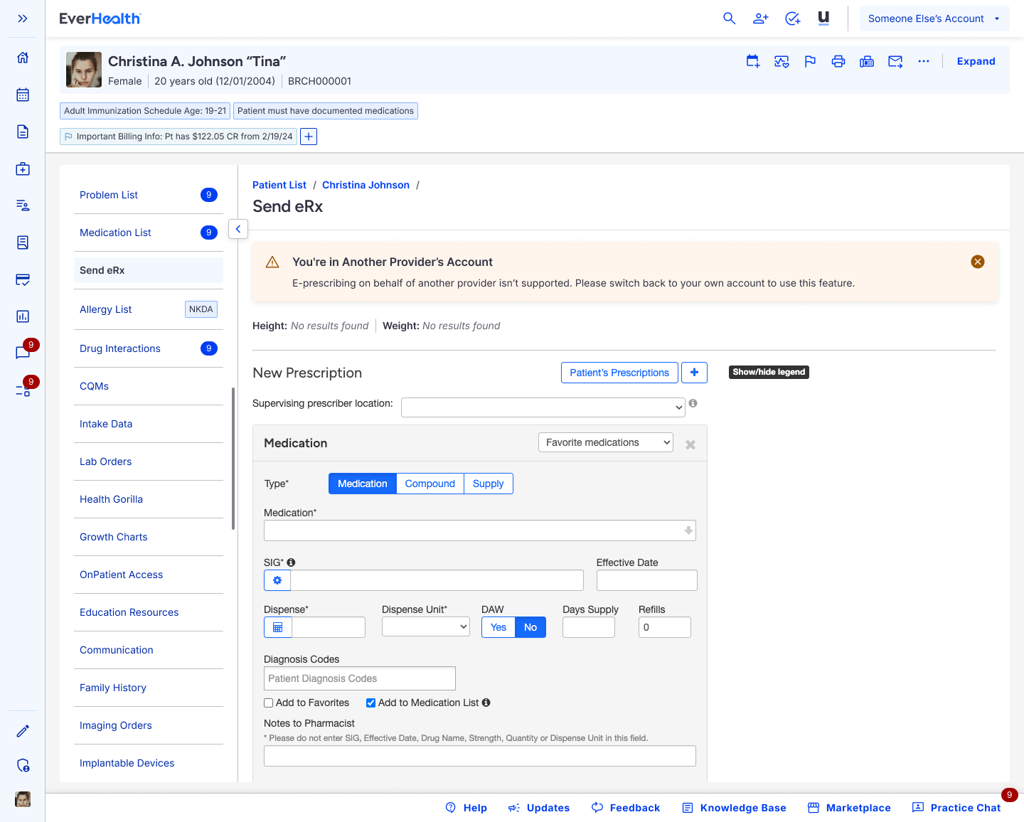
System indicators:
- A warning message appears in the header indicating the user is logged into another user’s account
- A banner in the Send eRx section explains that full functionality requires returning to the user’s own account or appropriate delegate permissions

Actions providers cannot perform on behalf of another provider
Providers acting on behalf of another provider (using the practice group dropdown):
- Cannot send prescriptions (controlled or non-controlled) on behalf of another provider
- Cannot complete RxChange, RxNew, or RxCancel requests for another provider
System indicators:
- A warning message appears in the header indicating the user is logged into another user’s account
- A banner in the Send eRx section instructs the user to return to their own account for full prescribing functionality