Highlights
| New Features | Coming Soon |
|---|---|
| Clinical Form Management Enhancements Multiple Dashboard Views |
ONC Health IT Certification Updates Preview EDI Claim Billing Summary Enhancements No Show Predictor |
🌟 New features
Clinical Form Management enhancements
We’re excited to introduce new enhancements to Clinical Form Management designed to make creating, reviewing, and organizing your forms faster, easier, and more accurate. With Preview Mode, a rich text editor, customizable fields, and tagging, you can now see your changes in real time, format notes effortlessly, and keep your forms perfectly organized.

Beginning in mid-December, we will begin gradually retiring the Legacy Form Builder to support teams in transitioning to Clinical Form Management. For more details and answers to common questions, please refer to our FAQ article.
Preview Mode
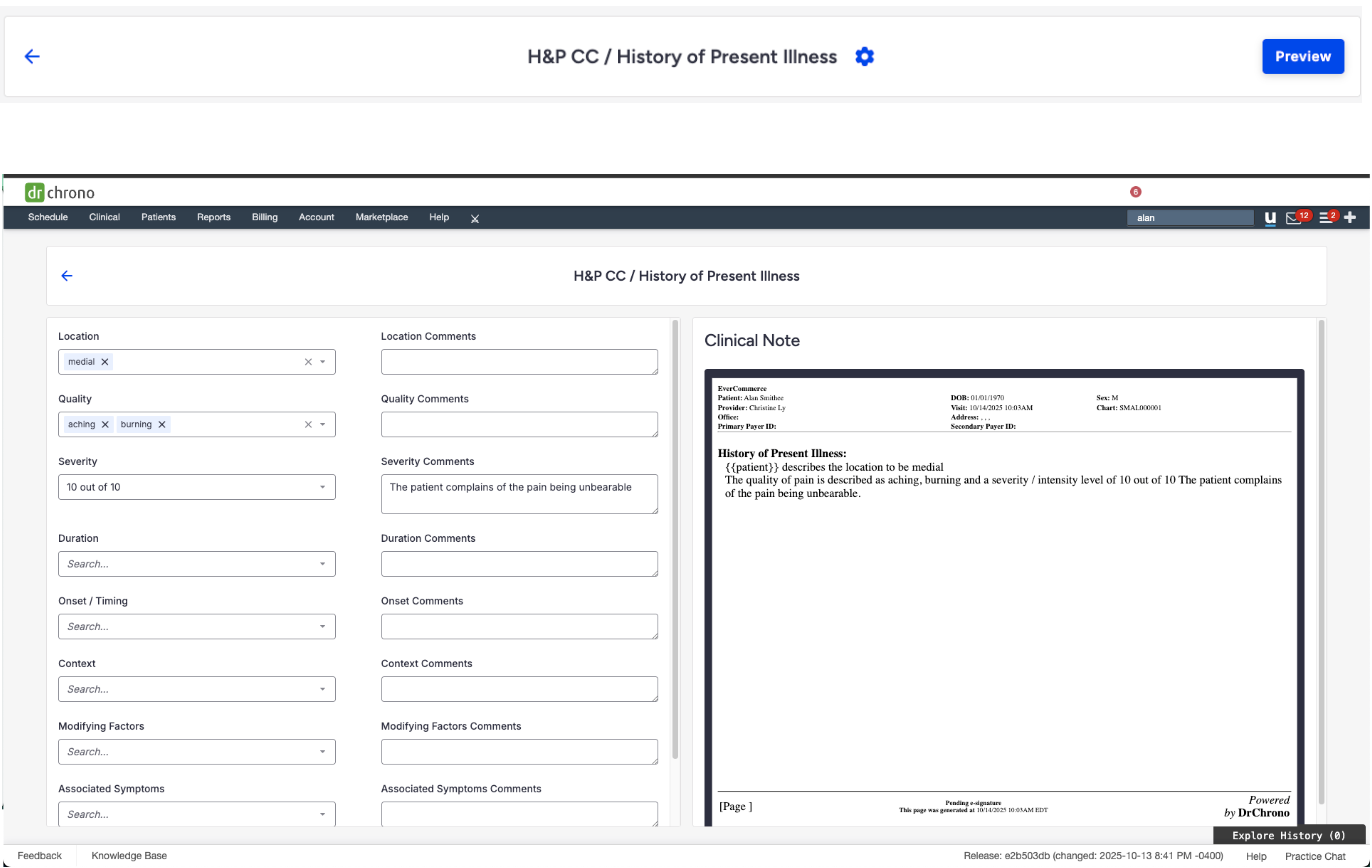
Experience a smarter way to build and review your clinical forms. The new Preview Mode in Clinical Form Management lets you interact with form elements live—seeing exactly how input values affect the form and the generated clinical note PDF in real time.
This update improves accuracy and efficiency when creating and reviewing forms.
📅 Feature rollout began October 28, with full availability by November 25.
Enhanced text editor
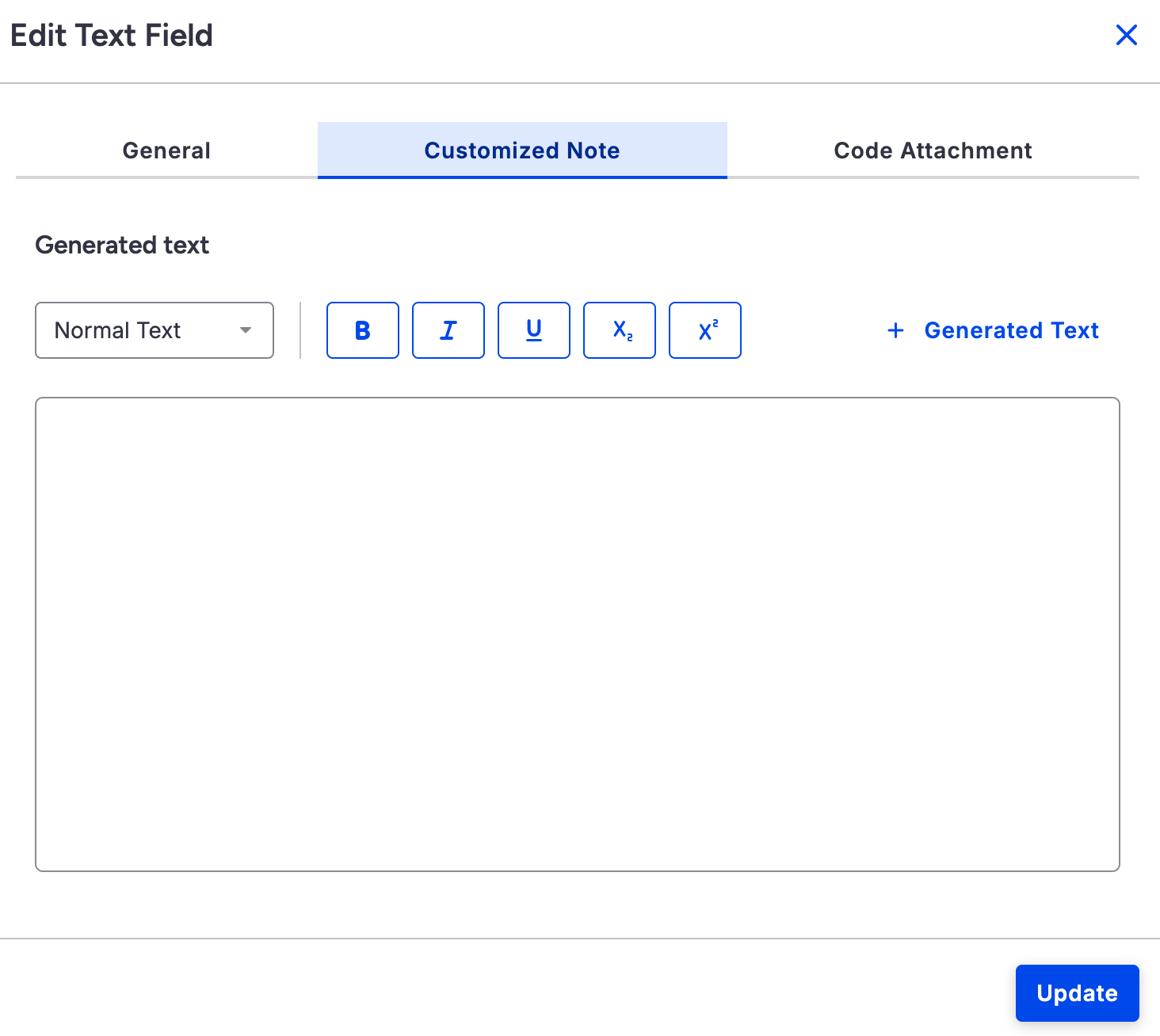
We’ve rolled out a new, easy-to-use text editor that lets you format your notes with styles like headings, bold, italics, underline, and more.
📅 Feature rollout began October 29, with full availability by November 25.

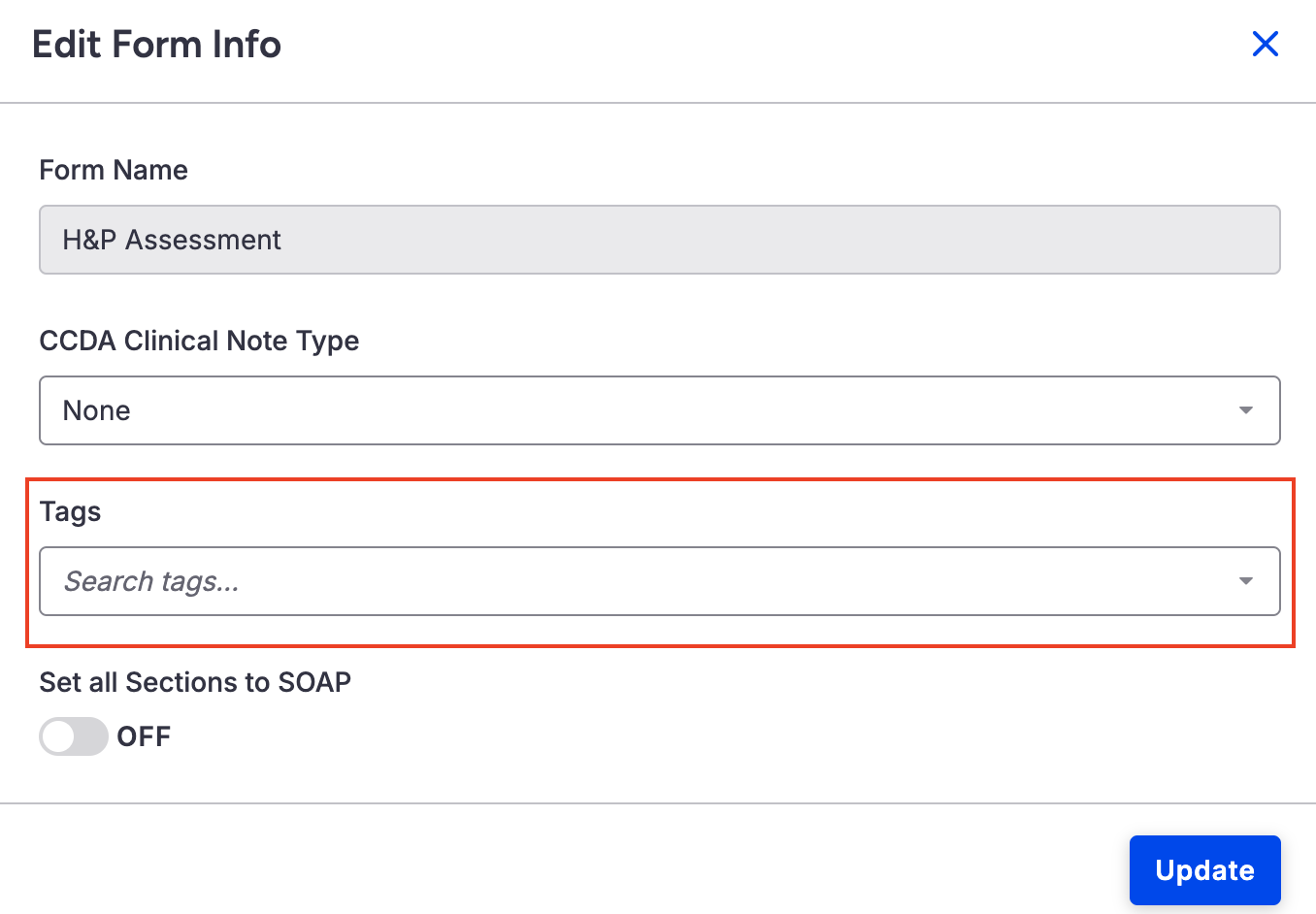
Form tags
Quickly find the forms you need by adding tags. Stay organized and save time searching through your forms.
Customize form fields
Use the enhanced Generated Text feature to add field values, question information, or patient details like their name, so your forms are more personalized and accurate.
Multiple dashboard views
Create multiple, customized Dashboard tailored to different work roles, offering your team greater flexibility and focus.
- 📋 Front office: Daily view highlighting schedules, patient check-ins, open tasks, and unread messages to efficiently manage patient flow.
- 💰Billing staff: Financial view to monitor outstanding claims, denials, and account balances—no extra navigation needed.
- 🩺 Providers: Personalized dashboards focusing on their schedules, clinical tasks, and incoming messages, so they always have critical information at their fingertips.
Customize your Dashboard to match how you work and what matters most.
📅 Feature rollout begins the end of November, with full availability by mid-December.

💡 Enhancements
New password reset option for existing staff accounts
You can now securely reset an existing staff member’s password using the email address on file. Password reset links are sent via email and remain valid for 72 hours. After completing the reset, the staff member must log in again with their new credentials. The Password field has been updated to include a Reset Password button.
📖 Create Staff Member Accounts
Removed OnPatient link in footer of telehealth reminder emails
We removed the OnPatient link that previously appeared in the footer of telehealth reminder emails.
Fee schedule bulk upload
We have enhanced the Fee Schedule Bulk Upload to include improved error handling and upload progress tracking. Now, when uploading a fee schedule, clear and actionable error messages will display when an upload fails, helping to quickly identify and resolve issues. There is also a new progress bar to provide real-time visibility into upload status. The progress bar will show the status of each file individually, providing a clearer view of ongoing uploads and their completion progress.
Billing intelligence reports
The new Business Intelligence menu is organized into two sections — Billing Intelligence and Practice Intelligence — each containing its own dedicated screens. Access is permission-based: users only see the sections they’re authorized for, with permissions automatically enabled for existing users. For new users, access to Billing Intelligence is granted to Providers, Billing Staff, and Office Managers, while Practice Intelligence is available to Providers, Staff, and Office Managers.
📖 Billing and Practice Intelligence Reports
Patient photo included in export files
We’ve enhanced the patient export feature! When exporting patient data—either for a single patient or in bulk—the patient’s photo is now included in the media file. This makes it easier to import complete patient records, including images, into other systems.
📖 Creating a New Request : EHI Export
Updated eRx banner message when acting on behalf of another user
We’ve improved the messaging shown in the Send eRx banner when a user is impersonating another account.
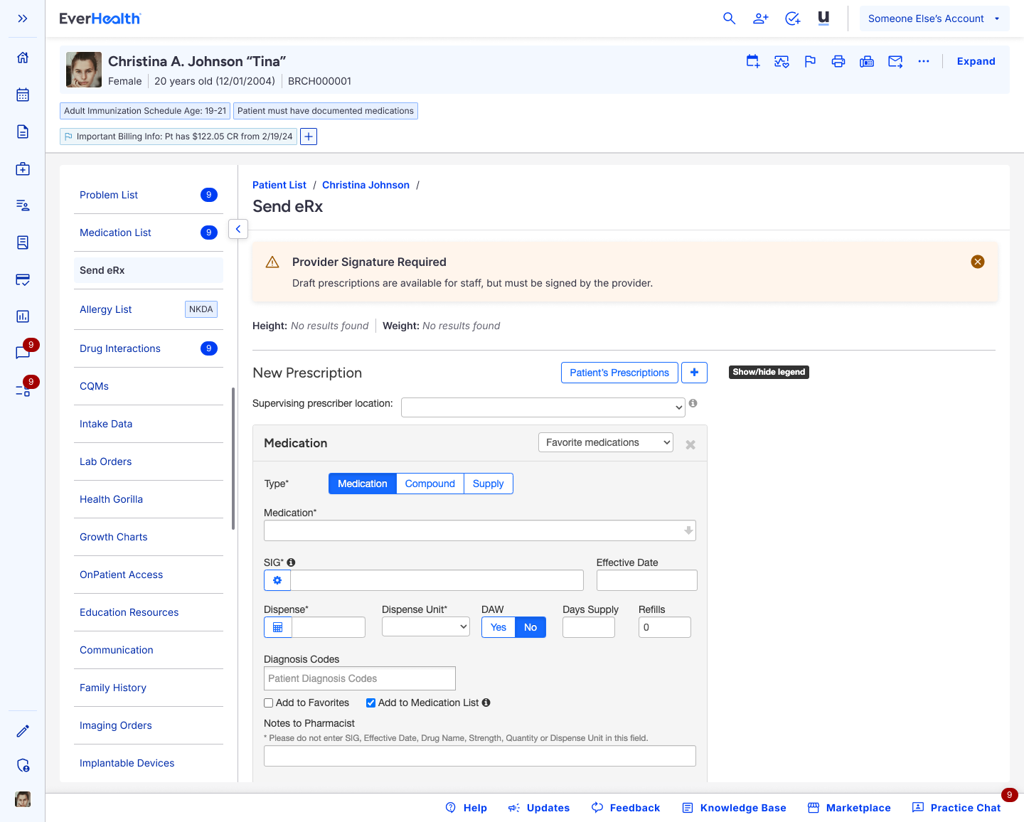
- For staff users: The banner now clearly explains that draft prescriptions can be created but must be signed by the provider.
- For provider users: The banner now states that e-prescribing on behalf of another provider isn’t supported and instructs users to switch back to their own account.
- The same updated messages now also appear during Rx Renewal, Rx Change, and Cancel Medication workflows to ensure consistent guidance.
📖 Non-Controlled Substance Prescription Limitations for Staff Acting on Behalf of Providers
| Banner for staff | Banner for providers |
 |
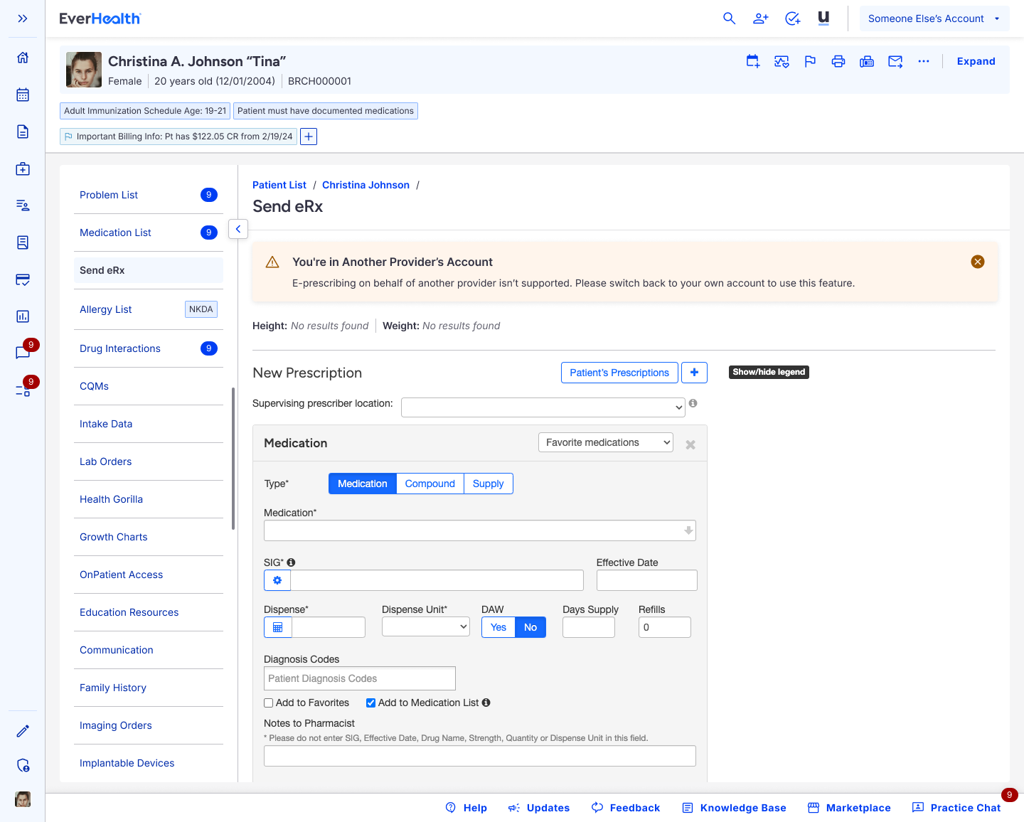 |
🐞 Resolutions
Unable to load the telehealth agreement PDF in Manage Offices
The telehealth agreement PDF loads as expected on the Manage Offices page.
Message Center permissions and unread message counts
When the Access to Message Center permission is turned off, unread message counts are now correctly hidden in the Message Center. Users with the Access All Messages for Practice Group permission turned on continue to see accurate unread message counts.
Availability API and appointment slot discrepancies
We fixed an issue that caused inconsistencies between the availability API results and the displayed open appointment slots. This update ensures that time slots shown in the DrChrono EHR app accurately reflect real-time availability.
Incomplete insurance information in printed patient demographics
Printed patient demographics for a patient with Workers’ Compensation insurance accurately show all updated insurance information, including the insurance mailing address.
Created By details for patient statements
We fixed an issue where, when patient statements are printed, the Created By field (showing the username of the individual who printed the statement) is recorded under Last Patient Statements in the Balance tab of the patient chart, as expected. The generated patient statement record will also display under Patient Demographics > Payment tab > Last Patient Statement section.
Date displayed in EOBs
We have fixed an issue where the EOBs accessed via the ERA button in remittance reports displayed the current date instead of the actual Date of Service. This update ensures the correct Date of Service is now shown, helping prevent confusion during claim audits and ensuring accurate reporting.
Modifiers and billing profiles
We resolved an issue that caused modifiers from applying correctly. Billing codes (CPT), modifiers, and associated charges now populate automatically in the appointment window upon initial selection, as expected based on the configured billing profiles.
Secondary claim submission when Medicare is primary
A new text field has been added in the Live Claims Feed to capture the primary claim number when Medicare is primary. When entered, the value will be automatically transmitted in loop 2330B REF*F8 of the secondary EDI/837 file, ensuring accurate and compliant claim submission.
📖 Secondary submission when Medicare is primary
Enhanced patient delivery statement types
The Enhanced Patient Statement Delivery option has been streamlined within the patient chart for improved clarity and ease of use. Users can now quickly see at a glance how a statement was delivered—whether by text, email, or paper mail—directly from the patient’s record. This update helps ensure faster tracking, better visibility, and more efficient follow-up for billing communication.
Multiple patient statements sent via text
On October 6, 2025, some patient statements were inadvertently sent multiple times via text. This occurred when statements were initiated several times throughout the day, resulting in multiple dispatches being queued and processed. A permanent fix has since been implemented, including enhanced duplicate-check safeguards to prevent this issue from recurring.
📖 Enhanced Patient Statement Delivery
As part of this release, we are continuing our ongoing work to assess, monitor, and address any security vulnerabilities.
✨ Coming soon
ONC health IT certification updates
This December, we’re releasing a set of updates designed to make your EHR smarter, more connected, and easier to use. These enhancements improve data quality, strengthen interoperability, and lay the groundwork for future automation—helping you deliver more coordinated, efficient, and patient-centered care with less administrative burden. This release is just the beginning of a stronger, more intelligent EHR experience.
Updated patient information fields
More complete and standardized demographic options to support better, more accurate patient records.
New structured health assessment tools
Easier ways to capture patient health information in consistent formats.
Care team & care plan enhancements
Tools that make it easier to identify who’s involved in a patient’s care and outline follow-up steps.
Improved data sharing (CCDA & FHIR upgrades)
Smoother, more reliable exchange of patient data with third-party apps, public health systems, and other providers.
Higher-quality, standardized data
Behind-the-scenes updates using national medical vocabularies (like SNOMED) for Social Determinants of Health so data is more accurate and easier to use.
Better foundation for future automation & AI features
These updates set the stage for smarter workflows, reduced paperwork, and more coordinated care.
📖 ONC HTI-1 Update 2025: USCDI v3
📅 Feature rollout begins December 16 , with full availability by December 18.
Preview EDI claim
The new Preview EDI Claim feature enhances transparency by allowing users to view the exact EDI data that will be transmitted to the clearinghouse. This visibility helps confirm that all claim details are correct before submission, reducing rejections and improving overall claim accuracy.
Billing summary enhancements
The Billing Summary report provides a clear overview of key performance metrics across monthly, quarterly, and yearly timeframes. It includes measures such as Clean Claim Rate, Net Collection Rate, Initial Denial Rate, Denial Rate (in dollars), Average Total Days for Payment, Charge Lag, Send Lag, and Payment Lag. A dynamic bar chart also allows you to compare charges and payments for the selected period.
No Show Predictor
No Show Predictor uses AI to assign a risk score to each upcoming appointment, helping your practice identify which upcoming visits are most at risk of a no-show.
This score displays on the No Show Predictor widget on the Dashboard, giving your staff clear visibility into potential no-shows and allowing for proactive outreach.
Key benefits
- 💸 Reduce lost revenue: Minimize empty appointment slots by identifying and addressing high-risk appointments.
- 🩺 Improve care continuity: Ensure patients receive timely care by identifying those most likely to miss visits.
- ⏱️ Optimize staff efficiency: Focus outreach where it matters most instead of calling every patient.
- 📲 Boost patient engagement: Use personalized reminders or rescheduling strategies for at-risk patients.

🌟 New feature video overview
Get ready for exciting updates! This month’s release is packed with powerful new features designed to elevate your workflow.
Watch our demo to see the latest enhancements in action and discover how they can boost your productivity and improve your practice experience.